
Download Core Temp – CPU temperature monitor, system performance tool, real-time CPU monitoring
Overview
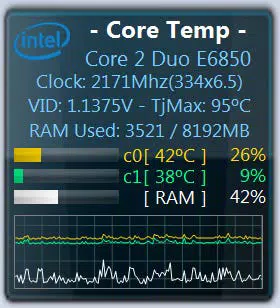
Core Temp Gadget is a lightweight Windows utility designed to deliver real-time insights into CPU performance and health. It functions as a desktop gadget that pulls data from the Core Temp application, offering users immediate visibility into the temperature, load, and operational status of each CPU core. The app is particularly useful for individuals managing high-performance computing tasks, troubleshooting thermal issues, or fine-tuning system settings. Its primary purpose is to provide accurate, continuous monitoring of critical hardware metrics without disrupting workflow or consuming excessive system resources.
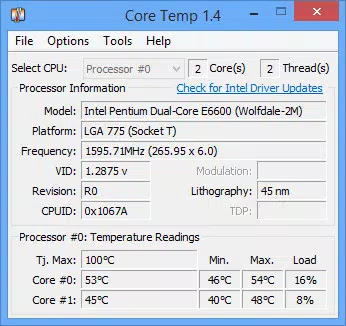
Target users include advanced PC users, system administrators, overclockers, and hardware enthusiasts who require granular control and visibility over their processor’s behavior. The app also serves as an educational tool for users interested in understanding how their CPU operates under varying workloads. By displaying real-time data such as core temperature, clock speed, load percentage, and platform details, Core Temp Gadget enables early detection of thermal throttling or performance anomalies.
Developed by ALCPU, the application operates within the Windows ecosystem and is distributed free of charge. While the developer did not provide additional technical details about their background or development philosophy, the app’s focus on system diagnostics aligns with a niche but essential category of software. It plays a supportive role in the broader system monitoring landscape, complementing other tools without duplicating functionality. For users seeking a compact, reliable method to track CPU health, Core Temp Gadget offers a focused solution tailored to hardware-centric workflows.
Key Features & Functionality
- Compact Interface: Designed as a minimal desktop gadget, it occupies limited screen space while delivering essential performance data, making it ideal for multitasking environments.
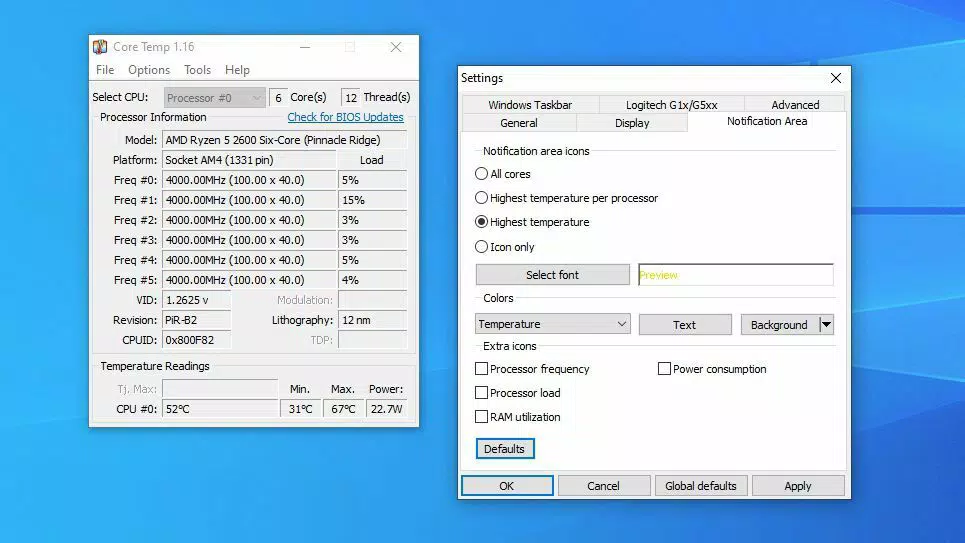
- Detailed Processor Information: Displays comprehensive CPU details including model, platform, frequency, VID, revision, CPUID, lithography, core and thread count, and per-core temperature and load.
- Real-Time Graphs: Visualizes core temperature, load, activity, and RAM usage in dynamic graphs, allowing users to track performance trends and spot irregularities.
- Customizable Display Options: Offers flexibility in how data is presented—users can toggle visibility of specific elements, adjust colors, and configure graph settings to match their preferences.
- Support for Overclocking and Tweaking: Provides real-time feedback crucial for users adjusting CPU settings, helping prevent overheating and instability during performance tuning.
For example, a user running a 3D rendering task can monitor temperature spikes across cores and adjust cooling strategies accordingly. An overclocker can validate stability by observing load and temperature patterns during benchmarking. Even non-technical users benefit from the transparency the gadget offers, gaining insight into how their system responds under stress. The integration with Core Temp ensures data accuracy and reliability, making it a trusted companion for system health checks.
Interface, UX & Performance
The interface of Core Temp Gadget is intentionally minimal, focusing on clarity and functionality. It presents data in a clean, uncluttered layout that avoids visual distractions, ensuring users can quickly assess CPU status at a glance. The gadget uses a monospaced font and consistent color coding to differentiate between temperature levels, load percentages, and other metrics, enhancing readability.
Navigating the gadget requires no complex setup—once Core Temp is running, the gadget automatically begins displaying data. Users can access customization settings through a right-click menu, which allows adjustments to display elements, color schemes, and graph refresh rates. The UI responds promptly to user input, with no noticeable lag during configuration changes.
Although the developer did not list formal performance metrics, the gadget operates efficiently with minimal impact on system resources. It runs in the background without consuming significant CPU or memory, making it suitable for use on both high-end and mid-tier systems. Responsiveness is consistent across different screen resolutions and window layouts. Stability is maintained during extended monitoring sessions, with no reported crashes or data corruption. The gadget remains reliable even when other intensive applications are active.
Platform Compatibility & Technical Requirements
Core Temp Gadget is designed for the Windows operating system and requires the presence of ALCPU’s Core Temp application to function. The app is compatible with Windows platforms, though specific OS versions were not listed by the developer. The file size is 1.3 MB, indicating a lightweight installation with minimal storage footprint.
Since the developer did not specify minimum OS requirements or hardware compatibility, users should ensure their system supports the latest Windows updates and has sufficient administrative privileges to run background monitoring tools. The gadget is distributed as a free utility, with no in-app purchases or subscription models. It does not require an internet connection to operate, making it suitable for offline environments.
Compatibility information was not fully disclosed. Users are advised to verify that Core Temp is installed and running before attempting to use the gadget. The application is not available on mobile platforms, as it is strictly a desktop tool for Windows.
Pros and Cons
Pros
- Lightweight and efficient, with minimal impact on system performance.
- Provides real-time, accurate data on CPU temperature and load per core.
- Features customizable display options for personalization and clarity.
- Offers detailed processor diagnostics useful for troubleshooting and optimization.
- Free to download and use, with no hidden costs or ads.
Cons
- Requires Core Temp to be installed and active to function.
- Platform is limited to Windows; no support for macOS or Linux.
- Customization options are limited to display settings, with no advanced configuration for data logging or alerts.
- Not available as a standalone app—dependent on another software component.
- Developer did not provide detailed system requirements or compatibility matrix.
FAQ
Is Core Temp Gadget safe to download and install?
Yes, the app is distributed free of charge by ALCPU and does not contain malware or intrusive tracking. It operates as a lightweight desktop gadget with no known security risks when used with the official Core Temp application.
Can I use Core Temp Gadget without installing Core Temp?
No. The gadget relies entirely on Core Temp for data input. It cannot function independently and requires Core Temp to be installed and running in the background.
Does Core Temp Gadget work on all versions of Windows?
The developer did not specify exact OS compatibility. While it is designed for Windows, the exact supported versions were not disclosed. Users should ensure their system meets the requirements of Core Temp for full functionality.
Is the app updated regularly?
While the app's version is 1.0.0.1, the developer did not provide information on update frequency or release schedule. Users should check the official website for the latest version.
Can I use this tool for monitoring GPU temperatures?
No. Core Temp Gadget is designed exclusively for CPU monitoring. It does not track GPU temperature or performance metrics. Users seeking GPU monitoring should use dedicated tools such as GPU-Z or MSI Afterburner.
Final Thoughts
Core Temp Gadget stands out as a specialized yet powerful tool for users who demand precise insight into their CPU’s behavior. Its compact design, real-time data visualization, and deep integration with Core Temp make it an ideal companion for system health monitoring, performance tuning, and troubleshooting. While it is not a standalone solution and depends on another application, its efficiency and reliability justify its use within the Windows ecosystem.
It is especially valuable for overclockers, hardware enthusiasts, and IT professionals who need to maintain optimal system temperatures and stability. Even casual users can benefit from the transparency it offers, gaining a better understanding of how their system performs under load. With no cost, minimal resource usage, and a straightforward setup, the app delivers strong value.
For anyone seeking a dependable, free tool to monitor CPU temperature and load in real time, Core Temp Gadget is a must-have. Download Core Temp now.


